> For the complete documentation index, see [llms.txt](https://docs.singlefinance.io/single-finance-korean/llms.txt). Markdown versions of documentation pages are available by appending `.md` to page URLs; this page is available as [Markdown](https://docs.singlefinance.io/single-finance-korean/yield-farming/undefined-1/adjust-close-your-leveraged-yield-farming-position.md).
# Adjust/Close your Leveraged Yield Farming Position
레버리지 수익 농사 포지션을 조정/청산하십시오.
### Add more collateral
1\. Go to "My Positions" - Leveraged Yield Farming and click Add button.
2\. Supply either one or both assets in the "Add Collateral" section.

3\. After you supply more assets, your current leverage level will decrease (in the example from 2.5148x to 2.3458x) if you don't borrow more. You could also adjust the capital protection level at this step.

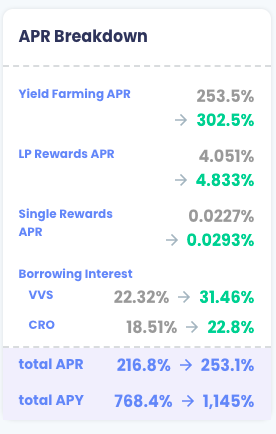
4\. As no further borrowing is made after adding collateral, the post-leverage ratio is lowered, you may find the APR drops accordingly.

5\. Click Single-Click button in the bottom bar and approve the transaction in wallet to finish the adjustment.

### Borrow More Assets from Lending Pool
1. Go to "My Positions" - Leveraged Yield Farming and click Add button.
2\. Scroll to the lower section of Borrow More and adjust the Leverage to your target level.

3\. After adjusting to your desired leverage level, such as 3x, you can adjust the percentage of either one of the assets, such as 60% of VVS and 40% of CRO. This will change the amount of two tokens you intend to borrow. You could also adjust the capital protection level at this step.

4\. Check the Summary of APR Breakdown again.
5\. Click Single-Click button in the bottom bar and approve the transaction in wallet to finish the adjustment.

### Close Position
1. Go to "My Positions" - Leveraged Yield Farming and click Withdraw button.
2\. Choose the percentage of the position you want to withdraw and the mode of withdrawal you prefer.
\
2a. Minimize Trading-> You can minimize the amount to trade with this mode. The transaction cost is the lowest among the three modes. But you may get both tokens instead of one.

2b. Convert to Token A/B (e.g. VVS)-> You would receive your selected token after our smart contract does the swap work for you. The transaction cost of the swap is charged by the DEX, e.g. VVS.finance in this case.

3\. Click Withdraw button to confirm the action. If you don't withdraw 100%, the total value of your remaining position cannot be lower than US$200 (for Cronos) or US$100 (for Fantom) because of the one-off capital protection fee (i.e. US$10 for Cronos or US$5 for Fantom).


 5\. Click Single-Click button in the bottom bar and approve the transaction in wallet to finish the adjustment.

### Close Position
1. Go to "My Positions" - Leveraged Yield Farming and click Withdraw button.
5\. Click Single-Click button in the bottom bar and approve the transaction in wallet to finish the adjustment.

### Close Position
1. Go to "My Positions" - Leveraged Yield Farming and click Withdraw button.
